 Rick Flair
WoW Forever Settings Quick Summary:
- WoW Forever adds upgraded lighting, shadows, atmospheric effects, HD models, and longer sightlines, making it noticeably more demanding than Classic Era.
- The goal is to preserve Forever’s improved visuals while keeping FPS stable in raids, Battlegrounds, cities, and other crowded content.
- Expensive settings such as Shadows, Lighting, Ambient Occlusion, Ground Clutter, and atmospheric effects should be lowered before sacrificing resolution or textures.
- Classic and Enhanced are only preset packages. Individual options like HD models, quest markers, One Bag, and Transmog can be changed afterward.
- Stable performance in large-group content matters much more than extremely high FPS while questing alone.
Want to start on a high note? Check out our Buy WoW Forever Gold and get as much as you need today!


Read closely 
Browse our hottest WoW Forever Boosting services








Best WoW Forever Graphics Settings
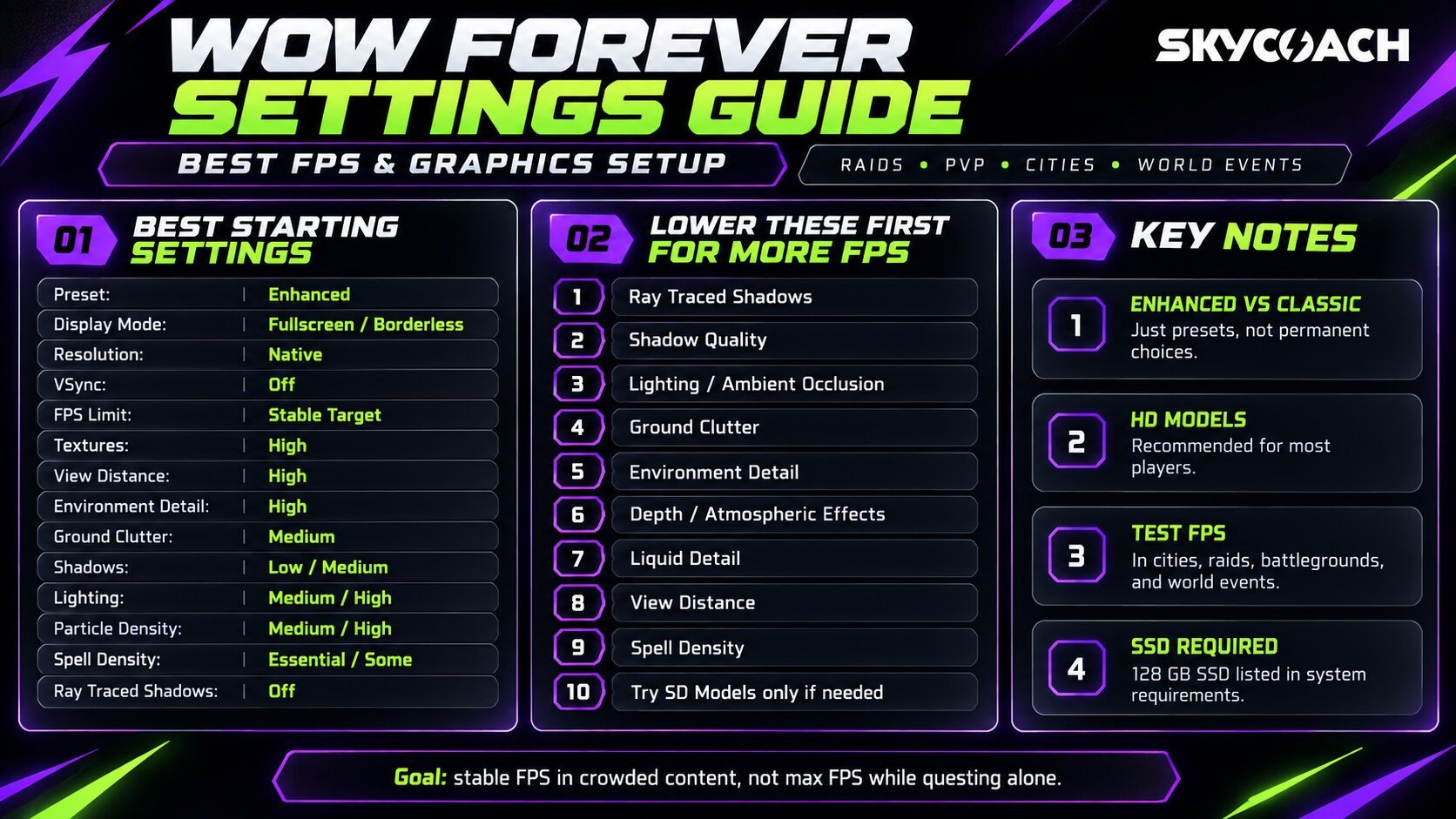
WoW Forever isn’t a simple Vanilla with higher-resolution textures slapped on top. Devs have updated the renderer with new lighting, shadows, mist effects, much longer environmental sightlines, and much more minor stuff. At the same time, it’s trying to keep the original Azeroth art style we so loved back in the old days instead of making everything look like Retail. This, obviously, also means the game is putting more strain on your CPU and GPU than normal Classic. I’ve tested these settings in cities, raids, Battlegrounds, and world events. Basically, most places where your FPS would plummet in normal conditions. I don’t have the best PC settings, cause I’m using a laptop with a mobile 3060, 32gb DDR5 RAM, and a 12th-series Intel CPU as my main working environment, and I use a console for most modern gaming, so you can be sure that my optimized settings will work on most modern machines with no problem. These are the values I use as the starting point based on the confirmed Forever graphics features and the options WoW’s current engine already uses:
|
Setting |
Recommended Option |
Explanation |
|
Visual Preset |
Enhanced |
Start from here. You can disable any modern features you dislike afterward |
|
Character Models |
HD |
The models look much better, and Forever restores Classic animations to them |
|
Display Mode |
Fullscreen/Borderless |
Fullscreen if you only care about performance. Borderless if you alt-tab |
|
Resolution |
Native |
Don’t drop resolution, like ever |
|
Render Scale |
100% |
Native image quality unless your GPU begs for help |
|
VSync |
Off |
Avoid extra latency unless screen tearing bothers you. |
|
FPS Limit |
Stable Target |
60, 90, 120, etc., depending on what your PC can actually maintain. Never put it on unlimited unless your PC can go beyond your display’s refresh rate. Otherwise, you’re just straining your PC for no reason |
|
Texture Quality |
High |
Keep it high unless you’re running out of VRAM |
|
View Distance |
High |
Forever’s longer sightlines are worth keeping. I suggest keeping it high, since it’s one of the key features |
|
Environment Detail |
High |
Keeps the world looking good without maxing every distant object |
|
Ground Clutter |
Medium |
Grass is nice, makes the world feel more immersive, but it’s not worth the frame drops |
|
Shadow Quality |
Low/Medium |
One of the first settings to drop, shadows are very taxing on your fps |
|
Liquid Detail |
Medium |
Forever’s new water looks good, but Medium is pretty enough and doesn’t eat your frames |
|
Lighting Quality |
Medium/High |
New lighting is one of Forever’s biggest graphical upgrades, but it isn’t free. If you can, raise it to High. |
|
Particle Density |
Medium/High |
Important for spell readability. Don’t put it on Low. |
|
Projected Textures |
On |
Keep this on. Ground mechanics are more important than five extra FPS. |
|
Spell Density |
Essential/Some |
Reduce visual spam while keeping important mechanics visible. |
|
SSAO/Ambient Occlusion |
Low/Medium |
Nice depth effect, but higher settings don’t really improve the image detail that much. |
|
Depth Effects |
Low/Medium |
Responsible for the new fog and atmospheric effects. I love how fog looks, but if you don’t mind some visible shimmer at the fog’s edge, put it on Medium or even Low if you need those extra FPS |
|
Compute Effects |
Medium |
Start here and lower it if large fights take a big hit on performance. |
|
Anti-Aliasing |
CMAA 2 |
WoW doesn’t need extremely expensive AA at modern resolutions. |
|
Ray Traced Shadows |
Medium/Off |
During calmer gameplay, turn it on for a pretty picture, but during Raids, off is the way to go unless you have a 5090 |
With these settings, I get around 100-120 fps. During especially heavy scenes, it goes to around 70, which is pretty playable in my opinion. Some might argue that laggy WoW during raids adds up to that nostalgic 2004 experience.
Classic or Enhanced Graphics?
When you first log in to WoW Forever, it asks you to choose between Classic and Enhanced. Classic starts with:
- SD character models
- Quest POIs off
- Objective blobs off
- One Bag off
- Transmog off
Enhanced starts with:
- HD character models
- Quest POIs on
- Objective blobs on
- One Bag on
- Transmog on
Make no mistake, these aren’t separate servers or permanent choices. They’re basically preset packages, and you can change the individual options afterward. If you need a recommendation, then pick Enhanced, unless you’re a full-on purist. Modern sensibilities don’t make the game less immersive. In any case, you can always toggle some of these options off if you don’t like them. If you want HD models but hate quest blobs, just turn the blobs off.
HD or SD Character Models?
This setting doesn’t influence your FPS drastically. Go with HD unless you specifically prefer the Vanilla look. Forever’s HD models are much more interesting. They’re not just ripped from modern WoW models because Blizzard has restored the Classic animation sets for them. So you get the extra model detail without it feeling like you’re just playing Retail. The toggle is also game-wide. Your character, NPCs, and other players all use whichever presentation you choose.
View Distance
For me, View Distance is what makes the open world feel so much more immersive. With WoW, it’s not that straightforward, though. Since the original locations usually hide the edge of the map behind mountains or walls, this setting can work better in some areas, while in others it won’t do much. The new environmental work is supposed to make the old world feel larger and more connected, so putting View Distance on minimum kinda defeats the point. I feel like Medium is a happy middle point, while High is all you need.
Shadow Quality
Shadows are the first setting I attack if FPS is bad. Forever’s lighting system is much more advanced than Classic’s, which is great until you have a crowded town, lots of foliage, multiple light sources, and 30 players running around. Low or Medium should be enough. I wouldn’t spend a pile of GPU power making every tree cast a beautiful shadow while fighting Onyxia.
Particle Density and Spell Density
Don’t put everything on minimum. This is an MMO. These graphical effects carry information. Ground AoEs, boss abilities, enemy casts, and PvP effects need to remain visible. The goal is reducing everyone else’s visual spam without removing the stuff that tells you where not to stand. That should become even more important when the first Forever raids open on December 9.
Ray Tracing
Ehhh, I’m torn on this setting. On one hand, Ray Traced Global Illumination makes the game visuals oh so much better, but on the other hand, on budget-to-average GPUs, it eats a lot of VRAM and resources. WoW, being an open-world kind of game, is more likely to strain your CPU resources calculating all player and NPC actions than strain your GPU, so maybe set GI to medium and watch how it works out. In Raids, though, I don’t recommend turning it on.
How to Get More FPS in WoW Forever
If Forever runs badly, don’t be in a hurry and drop the visuals back to 2004. I mean, it all comes down to preference, as Forever and Classic visuals are a stylistic choice first and foremost, but if you want to stay on Forever, change settings in this order:
- Disable Ray Traced Shadows
- Lower Shadow Quality
- Lower Lighting/Ambient Occlusion
- Reduce Ground Clutter
- Reduce Environment Detail
- Lower Depth/Atmospheric Effects
- Reduce Liquid Detail
- Lower View Distance
- Reduce Spell Density
- Try SD Character Models
If nothing helps and your 1050 struggles to maintain a somewhat playable framerate, then, and only then, drop your graphics to Classic state. Now don’t trust high fps in empty areas. If you really want to see how your game behaves with high visual settings, test them in:
- Crowded cities
- Battlegrounds
- Raids
- World events
- Large groups of players
Getting 180 FPS while killing boars isn’t an indicator of good performance. Go to Stormwind and play there for a while. Also, if your FPS stays low regardless of resolution, that’s usually a clue that the CPU is holding you back. It’s called a bottleneck. If it happens, it’s about time to upgrade your PC.
WoW Forever System Requirements
WoW Forever is much heavier than Classic Era. Blizzard’s current requirements are actually pretty close to modern WoW rather than what most people associate with Classic.
|
Component |
Minimum |
Recommended |
|
OS |
Windows 10 64-bit |
Windows 11 |
|
CPU |
6 cores, 4.0 GHz boost, Coffee Lake / Ryzen Zen 2 |
8 performance cores, 5.2 GHz boost, Core Ultra Series 2 / Ryzen Zen 5 |
|
GPU |
DX12, 4 GB, GTX 10 Series / RDNA 1 / Intel Xe2-LPG |
DX12, 8 GB, RTX 40 Series / RDNA 3 / Intel Arc B-Series |
|
RAM |
8 GB |
16 GB |
|
Storage |
128 GB SSD |
128 GB SSD |
|
Internet |
Broadband |
Broadband |
|
Resolution |
1280×720 minimum |
1280×720 minimum |
The recommended RTX 40 Series requirement looks kinda insane when you first see it, especially when you take into consideration that it’s just Classic Azeroth with pretty visuals. The minimum requirement is a 4 GB GTX 10-series-class GPU, which is a completely different level of hardware, so that makes me hopeful that this game will run on pretty much anything. The CPU requirement is potentially the biggest in order of importance. WoW loves strong single-thread performance. Make sure your CPU is on par with the recommended settings. I’m gonna be honest, the minimal required CPU will likely make your game stutter a lot. Finally, don’t install Forever on an HDD. New asset streaming is likely to break if you do it.
F.A.Q
What are the best WoW Forever settings for FPS?
Start with native resolution, VSync Off, High textures, Medium Environment Detail, Medium Ground Clutter, Low/Medium Shadows, and no ray-traced shadows. Keep View Distance fairly high at first and lower expensive lighting and environmental options before touching it.
Which WoW Forever settings affect FPS the most?
I’d watch Shadows, lighting, View Distance, Environment Detail, Ground Clutter, atmospheric effects, and player/spell density first. We’ll be able to rank them much more accurately once the September 17 Beta exposes the final graphics menu.
Should I enable ray tracing in WoW Forever?
It depends. I generally wouldn’t. Ray-traced shadows usually cost far more performance than they’re worth in an MMO, especially when stable FPS during raids and PvP is the goal.
Does WoW Forever require an SSD?
Yes. Blizzard lists 128 GB of SSD space under both minimum and recommended PC requirements.
When does the WoW Forever Beta start?
The WoW Forever Beta starts September 17, 2026. The full game launches globally on November 4, 2026, with the first new raids opening December 9.