 Rick Flair
Ultimate AION 2 Settings for Graphics, FPS & Performance Quick Summary:
- AION 2 performance should be optimized around crowded cities, dungeons, and Abyss fights rather than solo FPS numbers.
- Shadows, Global Illumination, Reflections, player effects, and Model Quality are among the first settings worth lowering for extra FPS.
- Keep Texture Quality relatively high when VRAM allows, since lowering it usually provides little benefit unless memory is already full.
- DLSS Quality or Balanced can improve performance without heavily sacrificing clarity, while Frame Generation is better suited to PvE than competitive Abyss PvP.
- Large battles benefit from limiting other-player effects and enabling Same Appearance for Other Players to reduce the load from dozens of characters.
Feeling short on money? Aion 2 is a game where you'll need a lot of it. Lucky for you, we have Aion 2 Kinah on sale for a very fair price. Check it out!

Read closely 
Browse our hottest Aion 2 Boosting services








Best AION 2 Graphics Settings
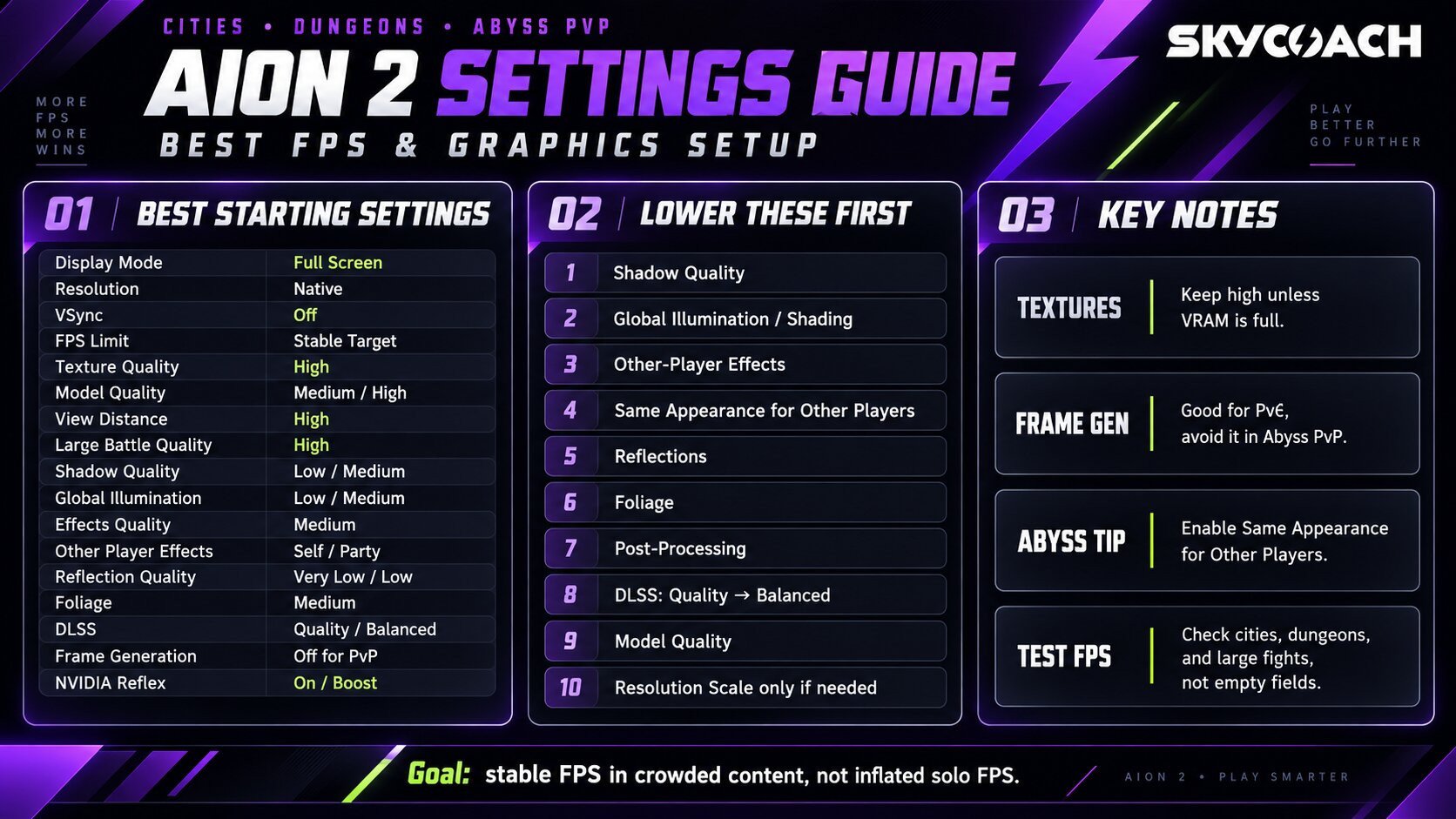
AION 2 runs on Unreal Engine 5, and you already know how this engine works. On PC, it’s usually a stutterfest. It honestly depends on the developer, but here we fortunately have a plethora of settings to play with. Shadows, lighting, reflections, and large numbers of player models are where most of the performance goes. Dropping everything to Low isn’t a solution either. With how modern games are optimized, you’re likely to have pretty much the same performance on low as you’d have on medium, and the visual difference is night and day. That’s why it’s crucial to understand what you’re doing with your graphics. These are the best AION 2 graphics settings for optimized gaming:
|
Setting |
Recommended Option |
Explanation |
|
Display Mode |
Full Screen |
Better for performance, but borderless is fine if you constantly alt-tab |
|
Resolution |
Native |
Keep your monitor’s actual resolution. Use DLSS if you want more frames. |
|
Resolution Scale |
100% |
Keep native scale unless you genuinely need more FPS. Never use it combined with DLSS, or you’ll get an awful-looking image. |
|
VSync |
Off |
Adds latency. Turn it on only if tearing bothers you and you don’t use VRR. |
|
FPS Limit |
Stable Target |
I’d rather cap FPS at something the PC can hold than watch it jump everywhere. If you have a 120 Hz display, you can cap it at 60 or 90 for a stable image. |
|
Texture Quality |
High |
Doesn’t hurt FPS if you have enough VRAM |
|
Model Quality |
Medium/High |
High on stronger PCs, Medium if mass PvP causes problems. |
|
View Distance Quality |
High |
Useful in open-world content and Abyss PvP |
|
Large Battle Quality |
High |
Helps keep important players and battlefield information visible |
|
Shadow Quality |
Low/Medium |
One of the easiest places to gain FPS. |
|
Global Illumination / Shading |
Low/Medium |
Looks good, but is very costly |
|
Effects Quality |
Medium |
Good balance between readability and visual candy |
|
Other Player Effects |
Self/Party |
Unless you have a really high-end PC, don’t turn it to full |
|
Reflection Quality |
Very Low/Low |
Nice for screenshots. Eats frames during combat. |
|
Foliage Quality |
Medium |
Unless you want your game to look like a PS3 game, don’t drop below medium |
|
Cloud Quality |
Normal |
Very High isn’t worth it. You’re not gonna look up that often, but you’ll feel the FPS drop |
|
Post-Processing Quality |
Very Low/Low |
Less bloom, vignetting, chromatic aberration, etc. |
|
Ambient Occlusion |
Low/NCAO |
Use the lighter option if available.Save your FPS |
|
Motion Blur |
Off |
There’s already enough movement when flying around. If the image feels a bit jittery, turn it on. |
|
Depth of Field |
Off |
Makes the image prettier and less readable at the same time. |
|
Camera Shake |
Off |
Helps with boss mechanics and PvP visibility. |
|
Same Appearance for Other Players |
On for Abyss |
Useful performance option for large fights. |
|
NVIDIA DLSS |
Quality / Balanced |
Quality for 1080p, Balanced for 1440p, Performance for 4K. |
|
Frame Generation |
Off for PvP |
Fine for PvE, but I’d prioritize actual FPS in competitive content. |
|
NVIDIA Reflex |
On/Boost |
On is enough for most people. Boost is worth trying under heavy GPU load. |
The setting to play with first is DLSS or FSR, since in one of the recent updates, the devs added DLSS 4.5 and FSR 4. The game should look even better now, with less blurriness. The settings I’d lower first are Shadows, Global Illumination, Reflections, other-player Effects, and Foliage. One setting that you won’t see in other games deserves special attention: Same Appearance for Other Players. Devs added it specifically as an Abyss optimization option. It displays standardized character appearances for players outside your party instead of loading everyone’s armor and cosmetics. Abyss is a real stress test for your PC, so if you don’t want it to melt, turn it on for Abyss.
Should You Use Frame Generation?
For PvE, sure. It makes the image much smoother. For PvP and anything that requires you to have as low of an input lag as possible, keep Frame Generation Off. First of all, unless your PC is already able to stay above 60 fps, forget about it. FG eats around 20-30% of your performance, and even though it’ll say 80 fps, it’s actually 40 fps input lag with 80 fps drawn. Latest FrameGen options lower that input lag to the point where it’s quite comfortable and doesn’t cause dizziness, but really, don’t bother. Bottom line, if your actual game is running at 35 FPS, turning the counter into 70 or 100 doesn’t magically fix the underlying performance.
Browse our hottest Aion 2 Boosting services







How to Get More FPS in AION 2
If AION 2 runs badly, don’t immediately start downloading someone’s giant Engine.ini file from a random forum. There are already plenty of those around, but first see whether the normal graphics menu can solve it. Here’s what you need to change first in your graphics menu:
- Lower Shadow Quality
- Lower Global Illumination/Shading
- Reduce other-player Effects
- Enable Same Appearance for Other Players in Abyss
- Lower Reflections
- Lower Foliage and Post-Processing
- Enable DLSS Quality
- Move DLSS to Balanced if you still need FPS
- Reduce Model Quality
- Lower Resolution Scale only after everything above
One setting that’s not worth your time is Texture Quality. It only ever influences performance when it goes beyond your VRAM, so if you have some VRAM space available, don’t lower it. Also, test performance somewhere that actually stresses the PC. Standing alone in an empty field and seeing 170 FPS isn’t an indicator of optimized graphics. Go into a city, dungeon, or Abyss fight and see what happens there.


You got -20% OFF 
AION 2 System Requirements
The current Global PC requirements list this hardware:
|
Component |
Minimum |
Recommended |
|
OS |
Windows 10/11 64-bit |
Windows 10/11 64-bit |
|
CPU |
Ryzen 5 2600 / i5-10500 |
Ryzen 7 3700X / i7-11700 |
|
RAM |
8 GB |
16 GB |
|
GPU |
GTX 1050 Ti 4 GB |
RTX 2070 8 GB |
|
DirectX |
DX12 |
DX12 |
|
Storage |
100 GB |
100 GB |
|
SSD |
Recommended |
Recommended |
|
1080p Preset |
Very Low |
Low |
The interesting bit is that even the recommended RTX 2070 configuration is paired with 1080p Low. That tells me devs are being pretty conservative with its performance targets, which is wise for an MMO. If your PC is stronger than the recommended specs, you can obviously turn plenty of settings higher.
F.A.Q
What are the best AION 2 settings for FPS?
Use Full Screen, native resolution, VSync Off, Low Shadows, Low Global Illumination, Low Reflections, and reduced other-player Effects. Keep Textures higher if you have enough VRAM, then use DLSS Quality or Balanced before aggressively lowering Resolution Scale.
What DLSS setting should I use in AION 2?
In short, use DLSS Quality at 1440p, Balanced or Performance at 4K, and DLSS Quality at 1080p. I know that some purists prefer to play without DLSS, but honestly, it makes the image so much better than native with little to no drawbacks that I don’t see any reason to stay on native.
Should I use Frame Generation in AION 2?
For PvE, sure. For Abyss PvP, I’d leave it off. Frame Generation improves displayed smoothness but doesn’t replace the responsiveness you get from a higher native framerate.
Which AION 2 graphics settings affect FPS the most?
I’d start with Shadows, Global Illumination, player Effects, Reflections, and Model Quality. Those are much more useful to reduce than immediately destroying Texture Quality or resolution.
How do I reduce AION 2 stuttering?
Lower Shadows and lighting, reduce other-player models and effects, use DLSS if available, keep the game on an SSD, and make sure the system isn’t running out of VRAM. If the problem appears mainly in crowded areas, player count is probably the bigger issue than raw GPU performance.