 Dallon Avery
Best WoW Forever Addons in 2026 Quick Overview:
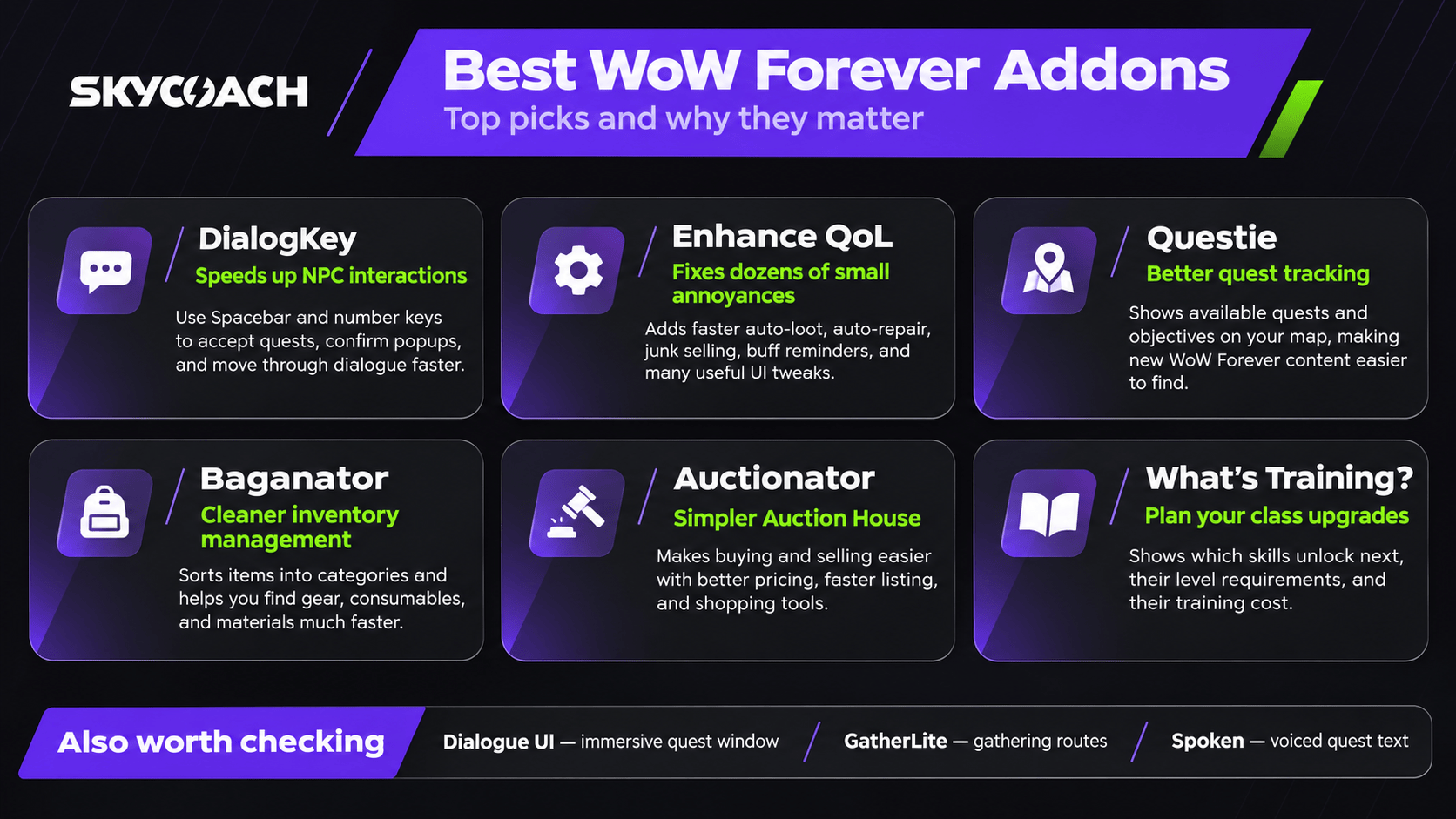
- DialogKey and Dialogue UI make NPC dialogues faster and more immersive
- Enhance QoL offers hundreds of useful tweaks, including faster looting, automatic repairs, and class buff reminders.
- Baganator and Auctionator simplify inventory management, item sorting, and selling items on the Auction House.
- Questie and What's Training? help you find available quests, plan your leveling, and keep track of upcoming class abilities.
- GatherLite, Details!, and Spoken improve gathering routes, combat tracking, and quest storytelling, respectively.
Stop worrying about your addons and enjoy a seamless and peaceful journey across Azeroth with a leveled-up character. Buy WoW Forever Powerleveling service at Skycoach and get any level you want faster, so you don't have to wait until your character becomes powerful enough to take on more than one mob at a time!


Read closely 
Browse our hottest WoW Forever Boosting services







Why Use Addons in WoW Forever
Everyone has always used addons in World of Warcraft, but they have changed a lot since the release of the Midnight expansion in retail. This is when the developers decided to make sure that most popular addons are not working in the game’s client anymore, instead offering their functionality through the game itself. Thus, now we have default damage meters, boss frames, and so on. And since the WoW Forever client is based on the most up-to-date version of WoW code, it means that the “addonopocalypse” is in it too. That means that you’re getting a lot of features and compatibility with modern WoW out of the box, even though none of that was here in the original game.
There’s been a complaint about WoW addons that you almost have to install them if you want to play the game seriously. So the devs have tried to make it so that you don’t have to do that anymore. Another reason why you should choose carefully which addons you install is the fact that the AI tools have reached such a point that they allow you to make things like WoW addons almost with one prompt. This has caused a flood of dubious-quality addons that will likely never be updated or supported in the future. So, if you want to install addons, it's best to make sure you’re choosing those that are made with actual dedication and plans to support them in the future with updates and such.
That’s why I’m making this list of the best addons to use in WoW Forever. You can, of course, choose to go the purist way and stay away from addons altogether, which is fine. Personally, I didn’t want to use any addons either, but somewhere along the way I just wanted to change some things, like being able to resize the menu windows or some other minor things. That’s how I ended up using some addons anyway.
DialogKey - Numy Edition
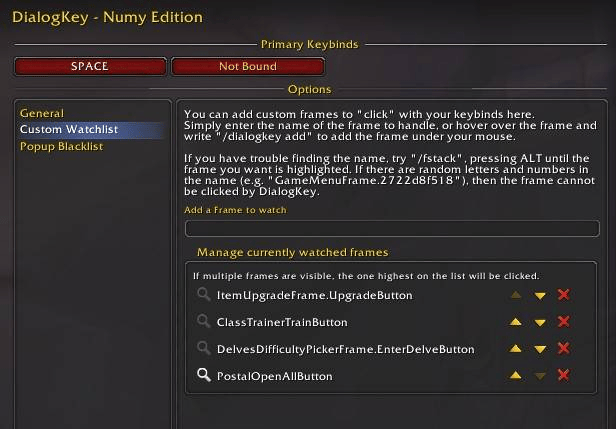
In WoW Forever, you need to use your mouse to click through dialogue options, and that’s generally fine, but there’s a faster and more comfortable way to do this by simply pressing a key. Imagine this is a “skip dialogue” option that doesn’t skip it but merely progresses the text dialogue window the same way you do it by moving your mouse cursor and clicking the right button within that dialogue window. And if there are multiple choices to pick from, you can just hit the number key on your keyboard that corresponds to each specific option. Isn’t that just better?
By default, DialogKey uses the Spacebar, but you can change the keybind or assign a second one. It works with pretty much everything you interact with regularly, including accepting and completing quests, selecting NPC dialogue options, confirming pop-ups, accepting group invitations, and even setting your Hearthstone location. Your Spacebar will still work for jumping whenever there's no dialogue or pop-up to interact with.
You can also add custom buttons to the addon by hovering over them and typing /dialogkey add, which is a nice bonus. Just keep in mind that DialogKey doesn't work during combat due to Blizzard's addon restrictions. Other than that, it's a tiny addon that makes a surprisingly big difference, especially considering how many NPCs you'll interact with while leveling from 1 to 60.
Download: DialogKey - Numy Edition on CurseForge
Dialogue UI
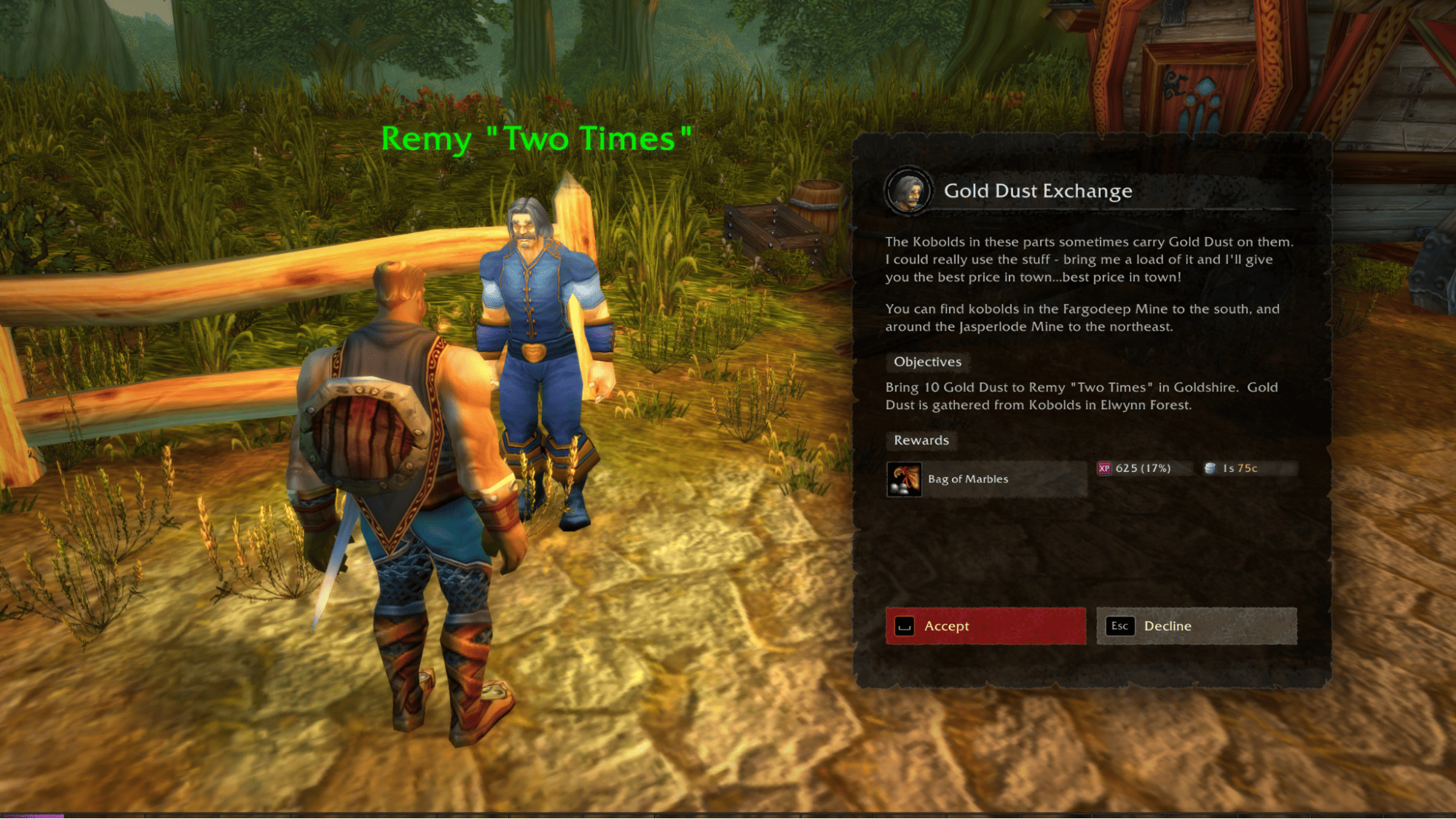
Dialogue UI is another addon that makes interacting with NPCs a better experience, although it works quite differently from DialogKey. Instead of making dialogue interactions faster, it replaces the standard quest window with a much more immersive interface that looks like a proper page from a fantasy RPG. You get larger, easier-to-read quest text, beautiful backgrounds, and both light and dark themes. Personally, I think this is a great addition to WoW Forever, where quest stories and exploration are such a big part of the experience.
One interesting feature is that Dialogue UI automatically adjusts your camera to focus on the NPC you're talking to. It makes conversations feel more personal, although the default zoom can be a bit aggressive. If you find it annoying, press F1 to open the addon's settings and adjust or disable the camera behavior. The addon also supports keyboard controls for selecting dialogue options, so you can use number keys instead of clicking everything manually.
I'd say this is one of those addons that you don't really need, but once you've played with it for a while, going back to the regular quest window feels like a downgrade.
Download: Dialogue UI on CurseForge
Forever Quest Tint
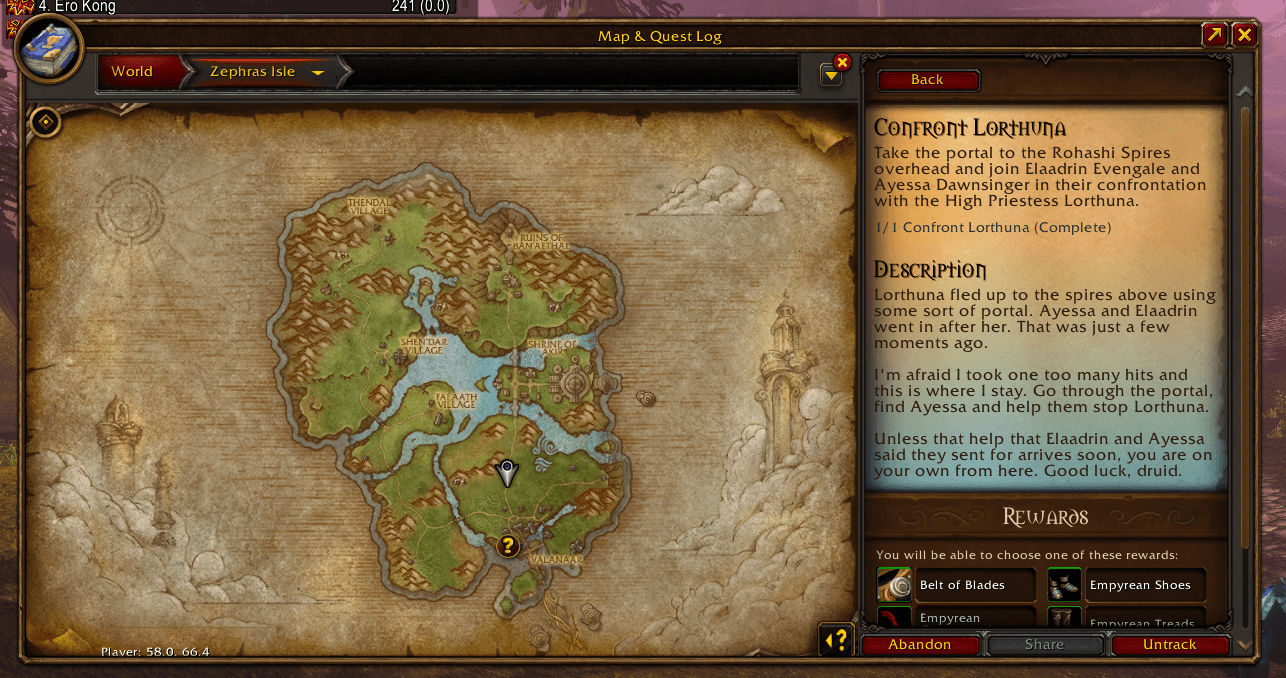
Forever Quest Tint is an extremely simple addon, but I think it's particularly useful if you've already played through WoW Classic and want to experience all the new content in Forever. As you probably know, Blizzard added over 1,000 new quests to the game, and keeping track of which ones are new isn't always easy. This addon solves that problem by highlighting quests that weren't present in the original Vanilla WoW.
Whenever you interact with a quest giver, new Forever quests get a light teal tint on their background, while original Classic quests keep their normal parchment appearance. The addon can also place a small infinity symbol next to new quests in your quest log and objective tracker, making them easier to identify without talking to every NPC.
You can customize the tint color, opacity, and visibility by typing /fqt or opening the addon settings. It also works with Dialogue UI, so there's no need to choose between the two. I'd definitely recommend installing this one if your main reason for playing Forever is discovering what's new.
Download: Forever Quest Tint on CurseForge
Enhance QoL
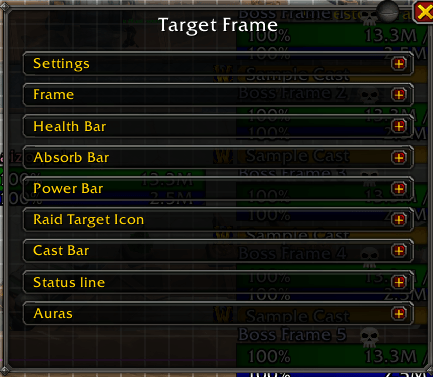
Enhance QoL is probably the most feature-packed addon on this list, and explaining everything it does would take an entire guide. It's essentially a massive collection of small quality-of-life improvements that fix annoying things about WoW's default interface. The best part is that every feature is optional, so you can enable only the changes you actually want instead of replacing your entire UI.
Personally, I'd start with the faster auto-loot option. It speeds up collecting items from defeated enemies, which is especially noticeable when you're farming hundreds of mobs. Another excellent feature is the aggressive class buff reminder, which helps you remember to refresh abilities like Blessing of Might or Mark of the Wild. You can also combine all your minimap addon buttons into one, automatically fill the confirmation field when deleting valuable items, and configure automatic equipment repairs and junk selling.
There are also more advanced features, including smart health and mana macros that select consumables based on what's available in your bags. This means you don't need to keep replacing potion or drink buttons whenever you get better consumables. Enhance QoL also lets you move and resize interface windows, fade action bars, and automate certain quest interactions.
You can open the settings with /eqol. My advice is to go through the options once, enable the things you find useful, and leave everything else disabled. You don't need all of its features to get a lot out of this addon.
Download: Enhance QoL on CurseForge
EllesmereUI

EllesmereUI is an addon I'd recommend primarily to players who enjoy customizing their interface. It's a complete UI overhaul that changes practically everything about how WoW looks, from action bars and unit frames to nameplates, chat windows, raid frames, and other interface elements. Think of it as an alternative to ElvUI, but designed around newer versions of WoW and their addon restrictions.
The amount of customization here is impressive. You can rearrange interface elements, change their appearance, adjust how combat information is displayed, and use community-made presets instead of configuring everything yourself. The addon also includes additional quality-of-life improvements, so it's much more than a purely visual replacement. And if you want something closer to the original game, there's a WoW Forever-style skin that helps preserve some of the Classic atmosphere.
However, I wouldn't call EllesmereUI essential for everyone. WoW Forever already has a pretty functional default interface, and replacing all of its original textures and visual elements can take away some of the game's charm. Personally, I prefer keeping the original Warcraft aesthetic wherever possible, although I can absolutely understand why someone would want a cleaner and more customizable UI.
If you're the kind of player who spends hours perfecting their action bars and raid frames, give this one a try. Otherwise, you can safely stick with Blizzard's interface and install smaller addons for specific features.
Download: EllesmereUI on CurseForge
EllesmereUI: Standalone Forever Essentials
If you like the functionality of EllesmereUI but don't want to completely change how WoW looks, there's a much simpler alternative. EllesmereUI: Standalone Forever Essentials takes a collection of quality-of-life features designed specifically for WoW Forever and makes them available without requiring the full UI overhaul.
One particularly useful feature discussed in the video is the threat meter. Threat is extremely important in Classic-style WoW, especially when you're playing a Tank or dealing damage in dungeons. Knowing how close you are to pulling an enemy away from your Tank can prevent some very unpleasant situations. The standalone Essentials package provides access to threat tracking without making you install and configure the entire EllesmereUI suite.
I'd say this addon makes the most sense for players who are happy with Blizzard's default interface but want additional tools built specifically for Forever. There's no need to install the full UI overhaul just to get access to a few convenient features.
Download: EllesmereUI: Standalone Forever Essentials on CurseForge
Baganator

Inventory management in WoW Forever can become a nightmare pretty quickly, especially when you're collecting quest items, crafting materials, consumables, and random equipment throughout your leveling journey. Baganator fixes this by replacing the standard bag interface with a cleaner system that automatically organizes your items into categories.
Instead of staring at dozens of identical inventory slots, you'll see separate sections for things like equipment, potions, food, and crafting materials. The addon comes with useful default categories, but you can create your own using search keywords. For example, using the keyword potion lets you group relevant consumables together, making them much easier to find during a dungeon run.
Another feature I particularly like is the ability to check items stored in your bank or on other characters without logging into them. Baganator remembers inventory information, so you can quickly check whether your alt already has a crafting material before buying more. It also offers inventory searches, sorting options, and the ability to move selected groups of items between your bags and bank.
You don't really need to configure anything to get started, which is a huge plus. Just install it and let the addon organize your bags. Keep in mind that Baganator requires Syndicator, which the CurseForge client installs automatically.
Download: Baganator on CurseForge
Browse our hottest WoW Forever Boosting services







Auctionator
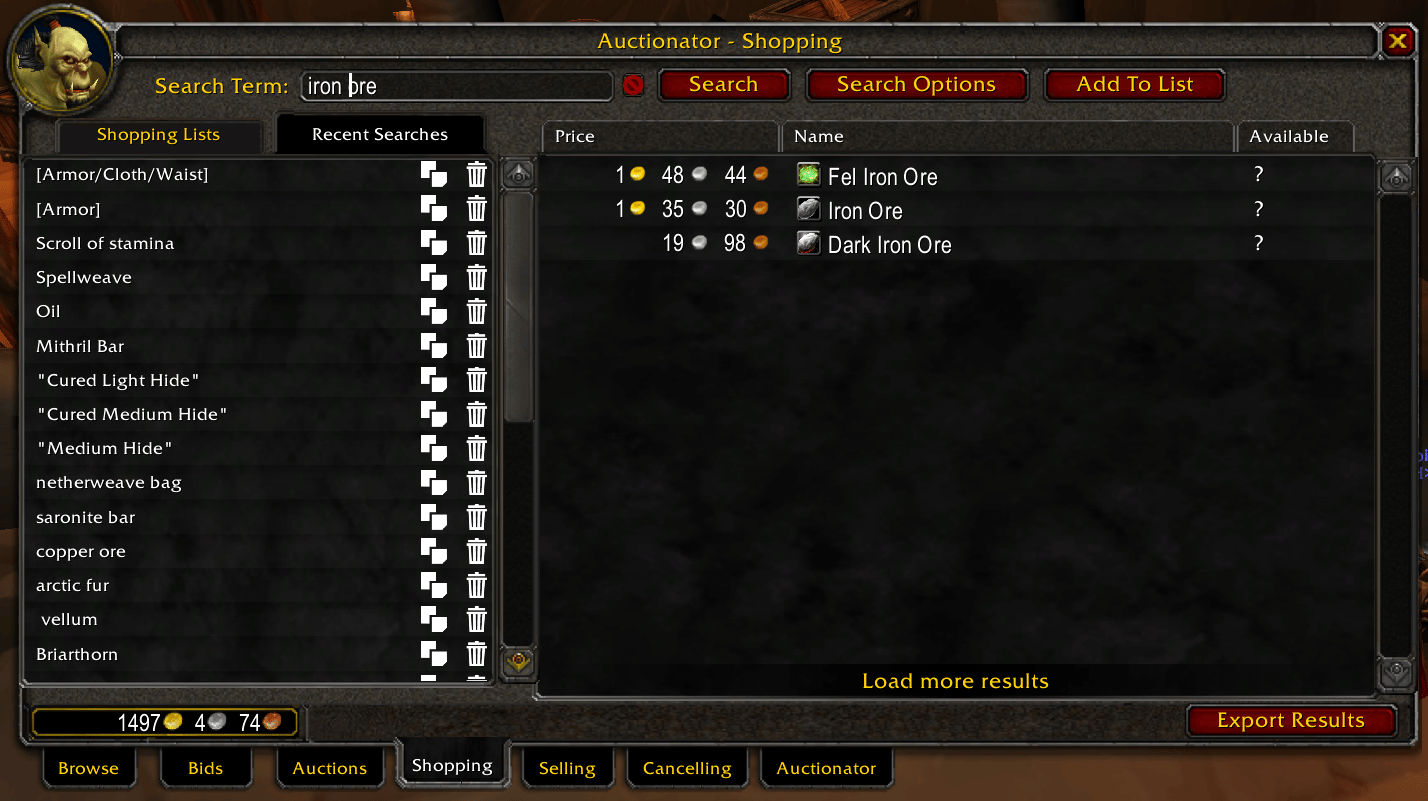
Auctionator is one of the addons I'd recommend to practically everyone planning to use the Auction House regularly. The default AH interface works, but it isn't particularly convenient when you're trying to sell a bunch of materials or compare prices. Auctionator makes the entire process much easier without turning the Auction House into some complicated trading simulator.
The feature you'll probably use most often is its selling interface. Select an item from your inventory, and Auctionator helps you price and list it based on the available market information. You can then move through your items much faster than with the standard interface. It also warns you when you're about to list something too cheaply and helps you avoid situations where selling an item to a vendor would actually earn you more gold.
Auctionator can also display auction prices in item tooltips, create shopping lists for items you purchase regularly, search for crafting reagents, and check whether someone has undercut your auctions. If you want updated price information, open its Auction House tab and use the Full Scan option.
There are more complicated alternatives like TradeSkillMaster, but personally, I'd stick with Auctionator unless you're planning to spend a serious amount of time playing the Auction House. For selling gathered materials, unwanted equipment, and crafted items while leveling, it does everything you really need.
Download: Auctionator on CurseForge
Chattynator
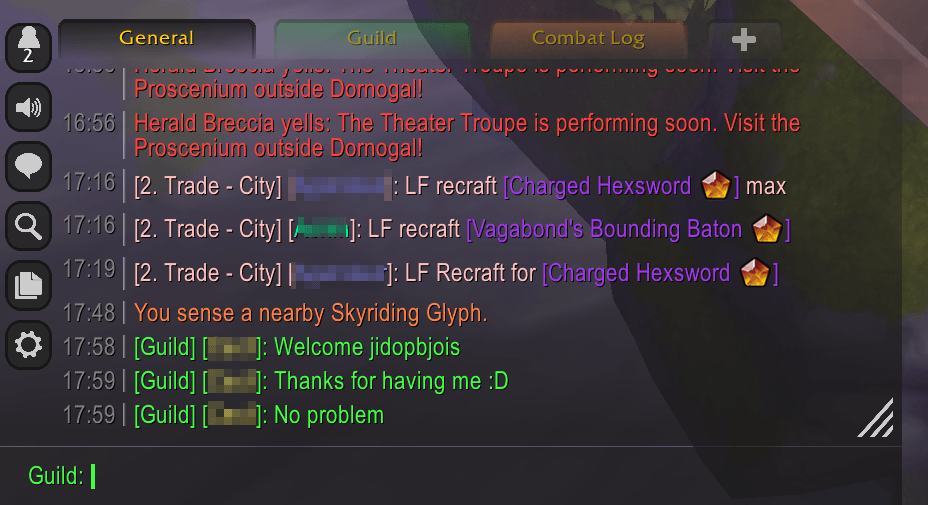
Chattynator is made by the same developer as Baganator and Auctionator, and it follows a similar idea: take something you use all the time and make it more convenient without overcomplicating things. In this case, we're talking about WoW's chat window. The addon replaces the default chat frame with a cleaner and more customizable version that still fits the game's original aesthetic.
One of its biggest advantages is how much screen space you can save. You can make the chat background transparent, adjust how quickly messages fade, and customize the fonts, spacing, and overall appearance. I'd recommend setting the background to transparent and reducing the fade delay if you want to keep your screen as clean as possible while exploring Azeroth.
Chattynator also remembers over 2,500 messages across sessions, which is a pretty substantial improvement over the default chat history. You can scroll through previous conversations, use the arrow keys to access previously typed messages, and customize timestamps. It even comes with several interface themes, including one based on Blizzard's original design.
Personally, I like that it doesn't try to turn the chat window into something completely different. It just makes communication smoother and less intrusive, which is exactly what I want from an addon like this.
Download: Chattynator on CurseForge
What's Training?
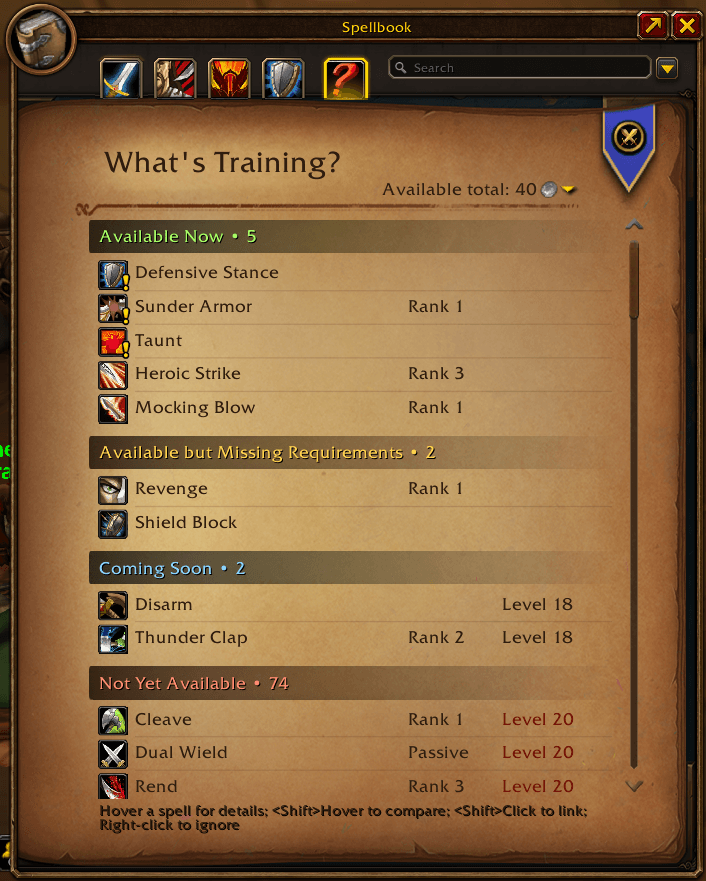
What's Training? is an addon that I think every beginner should consider installing. Unlike modern WoW, where most abilities are learned automatically, WoW Forever requires you to visit class trainers and purchase new spells as you level up. This creates an interesting problem: you don't always know whether returning to your trainer is worth the trip, especially when you're questing somewhere far away.
What's Training? solves this by adding a list of upcoming abilities to your spellbook. You can see which spells become available at specific levels, read their tooltips, and check how much gold, silver, or copper you'll need to learn them. This is particularly helpful when you're trying to save money for your first mount or deciding whether to return to town immediately after leveling up.
For example, imagine you're level 18 and the next ability you really want becomes available at level 20. Instead of making an unnecessary trip to your trainer now, you can continue questing for another two levels and learn everything at once. The addon also helps you plan your spending, so you don't arrive at your trainer only to realize you can't afford your new abilities.
The main What's Training? addon also includes support for weapon skills and a Forever professions window showing recipes from trainers and other sources. If you're playing an unfamiliar class, I'd say this is one of the most useful tools you can have during the early leveling experience.
Download: What's Training? on CurseForge
DungeonJournal
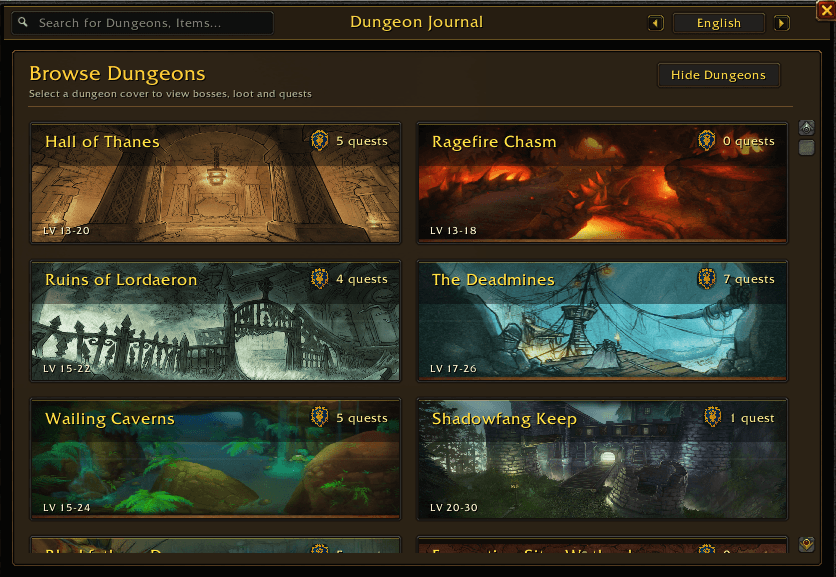
DungeonJournal brings something familiar from modern WoW into Forever: an in-game database of dungeons, bosses, quests, and loot. Instead of opening Wowhead every time you want to check what a particular boss drops, you can simply look it up without leaving the game. It's especially convenient if you're farming specific equipment upgrades or trying to decide which dungeon to run next.
The addon lets you browse dungeon bosses and their loot tables, check available dungeon quests, and examine potential rewards. You can also search for specific items, which makes finding equipment with particular stats much easier. For example, if you're looking for leather gear with Spell Power, you can use the journal to narrow down the available drops rather than checking every dungeon individually.
Another useful feature is the connection to your world map and group finder. You can select quests to see where they're located and use the journal alongside the group finder to organize your next run. To open it, simply type /dj in chat.
Now, I do think this addon takes away a little bit of the mystery that makes WoW Forever interesting. Part of the fun is entering a dungeon without knowing exactly what every boss will drop. However, if you're going to search for that information online anyway, having it available directly inside the game is definitely more convenient.
Download: DungeonJournal on CurseForge
Questie
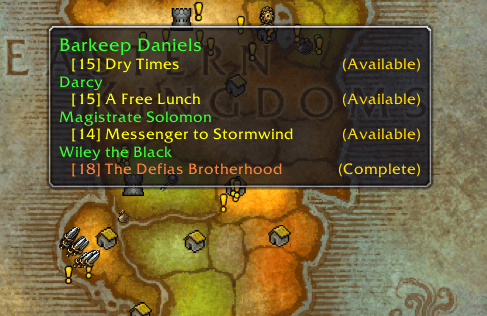
Questie is probably one of the most recognizable WoW Classic addons, and you've likely used it before if you've played any of the older versions of the game. Its main purpose is to make questing easier by displaying available quests, objectives, and turn-in locations directly on your map and minimap. However, there's an important difference in WoW Forever: Blizzard already provides its own quest objective tracker, so you don't necessarily need Questie for basic navigation.
The biggest reason I'd still recommend installing it is its ability to show quests you haven't picked up yet. WoW Forever introduces over 1,000 new quests, and some are located in places you might otherwise completely miss. Questie helps you find additional quest givers throughout Azeroth, which is particularly useful if you want to experience as much of the new content as possible.
It also provides a separate quest tracker, additional map markers, quest tooltips, and tools for checking completed or available quests by zone. There's even a Journey Log that records your questing progress. These are all useful features, although I wouldn't say every player needs them.
My advice is to disable Questie's replacement quest tracker in the settings if you prefer Blizzard's default one. Personally, I think the original tracker looks better, and there's no reason to have two interfaces doing the same job. You can access Questie's settings with /questie and customize which features you actually want to use.
Download: Questie on CurseForge
GatherLite
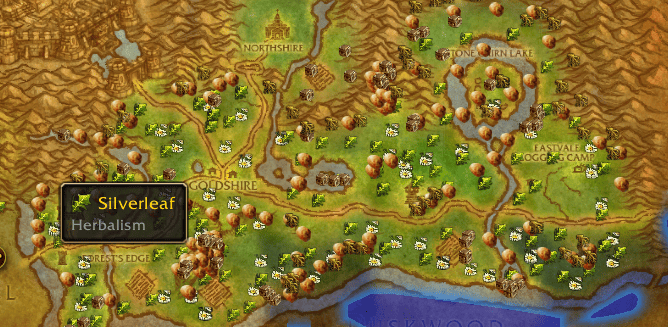
GatherLite is an excellent addon for anyone planning to level Mining, Herbalism, or Fishing in WoW Forever. Gathering professions can earn you a decent amount of gold, but finding resource nodes isn't always easy, especially if you're unfamiliar with the zones. GatherLite makes the process much more efficient by displaying known resource locations on your world map and minimap.
The addon includes a database of over 26,000 gathering locations, covering herbs, ore deposits, fishing pools, and even certain containers. You can search for specific resources and see where they're commonly found, including the profession requirements needed to collect them. Keep in mind that these are known spawn locations rather than guarantees that a resource will be available when you arrive.
What makes GatherLite particularly useful is its route-planning functionality. Instead of wandering around a zone hoping to find Copper Veins or Peacebloom, you can select a resource and generate a farming route. The addon will suggest a circuit through the relevant gathering locations, and you can follow that route directly on your minimap.
You can open the main interface using /gather, /gatherlite, or /gatherroutes. Personally, I'd install this as soon as I pick up a gathering profession, especially if I plan to sell materials on the Auction House. Having a proper farming route is a lot more efficient than running around blindly.
Download: GatherLite on CurseForge
Details! Damage Meter
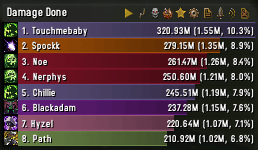
Details! has been one of the most popular damage meter addons in WoW for years, and it's still a solid option for Forever. However, there's one important thing you need to understand before installing it: damage meters work differently in WoW Forever because of Blizzard's newer addon restrictions.
The game already includes a built-in damage meter, and addons like Details! generally rely on the combat information Blizzard makes available rather than independently collecting and calculating everything as they did in older versions. This means you shouldn't expect Details! to provide a completely different level of combat analysis from what the game itself allows.
What it does offer is a more customizable way to view available combat statistics. You can adjust the appearance of your meter and use it to monitor damage, healing, and other supported combat information during dungeons and raids. It's particularly useful if you're already familiar with Details! and prefer its interface to Blizzard's default one.
That said, I wouldn't rush to install it on day one. The built-in damage meter is perfectly fine for regular leveling and most casual dungeon runs. EllesmereUI also includes its own meter, while Enhance QoL offers another alternative, so you might already have what you need without installing anything else.
One more thing worth mentioning is threat. Since WoW Forever uses Classic-style combat mechanics, keeping enemies focused on your Tank is extremely important. If you're looking for a dedicated threat display, the threat tools included with EllesmereUI or Enhance QoL are worth considering alongside your damage meter.
Download: Details! Damage Meter on CurseForge
Spoken
Spoken is probably the most unusual addon on this list, and I can see why some players might dislike the idea behind it. It uses AI-generated voiceovers to read quest dialogue, NPC conversations, zone lore, and in-game books aloud. Essentially, it gives WoW Forever something closer to the voiced storytelling you'd expect from a modern RPG, even though the original game wasn't designed around fully voiced quests.
What surprised me about this addon is how much attention goes into the voices themselves. They're designed to match specific characters rather than simply assigning the same generic voice to every Human or Orc. The addon also uses pronunciation rules for Warcraft names and locations, which helps the dialogue sound more natural. You can still tell that the voices are AI-generated, but the overall result can be pretty convincing.
However, the biggest advantage isn't necessarily the voice acting. It's the ability to listen to quest dialogue while continuing to play. Spoken can display a smaller dialogue interface, allowing you to read or listen to quest text while running toward your next objective. This means you can actually follow the story without spending extra time standing next to every quest giver.
Spoken also offers separate modules for quest dialogue, NPC gossip, zone narration, and readable books, so you can choose what you want to hear. One important installation detail is that the voice packs are downloaded separately. Installing the main addon alone won't give you the audio files. Make sure to install the relevant packs for your character's faction and whichever types of narration you want.
Personally, I think this is worth trying if you normally skip quest text but still want to understand what's happening in the story. It might not appeal to everyone, especially players who prefer the original Classic experience, but it's an interesting way to make questing more immersive without slowing down your leveling progress.
Download: Spoken on CurseForge


You got -20% OFF 
How to Install Addons in WoW Forever
Many of these addons work in retail as well; just check the tags on their webpage. Installing them is also very similar if you do it manually; only the game folders are different. Installing addons in WoW Forever is pretty simple, and you can do it either through the CurseForge app or manually. Personally, I'd recommend CurseForge since it handles installation and updates automatically. However, make sure you're installing addons for WoW Forever specifically, as the game uses a different client from Retail and Classic Era, and not every addon version is compatible.
Installing Addons With CurseForge
This is the easiest method, especially if you're planning to use several addons from our list. Here's what you need to do:
- Download and install the CurseForge app.
- Open CurseForge and select World of Warcraft from the game list.
- Choose WoW Forever as your game version. If it doesn't appear, scan for installed games or manually select your Forever installation folder.
- Open the Browse Addons tab and search for the addon you want.
- Click Install, and CurseForge will automatically download the appropriate files.
- Launch WoW Forever and check the AddOns menu on the character selection screen to make sure the addon is enabled.
That's pretty much it. You can also use CurseForge to update your installed addons without downloading everything again, which is especially useful after major game patches. This is actually why I prefer using the CurseForge launcher myself, since I can always easily update them all instead of having to go to each addon’s page to download and install the update myself.
Installing Addons Manually
If you don't want to use CurseForge, you can download addon files directly from their respective pages and install them yourself. The only important thing is placing them in the correct folder.
- Visit the addon's CurseForge page and download the .zip file marked as compatible with WoW Forever.
- Extract the downloaded archive.
- Open Battle.net, select WoW Forever, click the gear icon next to Play, and choose Show in Explorer.
- Navigate to the _forever_ folder, then open Interface → AddOns.
- Copy the extracted addon folder into AddOns. Make sure you copy the actual addon folder containing its .toc file, not an extra folder created during extraction.
- Restart WoW Forever and enable the addon from the character selection screen.
The final installation path should look something like this:
World of Warcraft\_forever_\Interface\AddOns
If your addon doesn't appear in the game, double-check that you've installed it in the Forever folder rather than _retail_ or _classic_era_. Also, make sure the addon is extracted properly and not sitting inside another folder. If it's marked as outdated, check for a Forever-compatible update before trying the Load out-of-date AddOns option.
F.A.Q.
What is the best addon to use in WoW Forever?
I'd recommend DialogKey - Numy Edition as the best addon for WoW Forever because it makes interacting with NPCs, accepting quests, and confirming dialogue options much faster. If you want something with more features, Enhance QoL is another excellent choice, offering hundreds of useful interface and gameplay improvements.
Do I need to use addons in WoW Forever?
No, WoW Forever is completely playable without addons, and Blizzard has already included several features that previously required third-party tools. However, addons can make leveling, inventory management, gathering, and other everyday activities much more convenient.
How to install addons in WoW Forever?
The easiest way to install addons in WoW Forever is through CurseForge, although you can also install them manually. Here's how to do it:
- Open the CurseForge app and select WoW Forever.
- Find the addon you want and click Install.
- Launch WoW Forever and enable it through the AddOns menu on the character selection screen.
For manual installation, extract the downloaded addon files into World of Warcraft\_forever_\Interface\AddOns and restart the game.
Does WoW Forever have a built-in damage meter?
Yes, WoW Forever includes Blizzard's built-in damage meter, so you don't need to install Details! or another addon to track your damage output. Third-party damage meters mainly offer different interfaces and customization options rather than completely separate combat tracking systems.
Can I edit the interface in WoW Forever without addons?
Yes, WoW Forever includes Blizzard's built-in interface customization tools, allowing you to move, resize, and rearrange supported UI elements without installing anything. However, addons like Enhance QoL and EllesmereUI provide considerably more customization options if you want greater control over your interface.