 Rick Flair
ARC Raiders Best Controller Settings Quick Summary:
- Turn off aim assist and set sensitivity as high as convenient to you.
- Choose one of the response curves: Exponential, Sinusoidal, or Linear. I recommend Linear.
- Tips about using the right response curve and what tools may help you win at the end of this article.
Having the right settings is good and all, but even the best settings won’t save you if you don’t have good equipment. Try our ARC Raiders Blueprints to completely dominate every raid you’re on.


Read closely 
Browse our hottest ARC Raiders Boosting services






Best Controller Settings for Speed & Accuracy
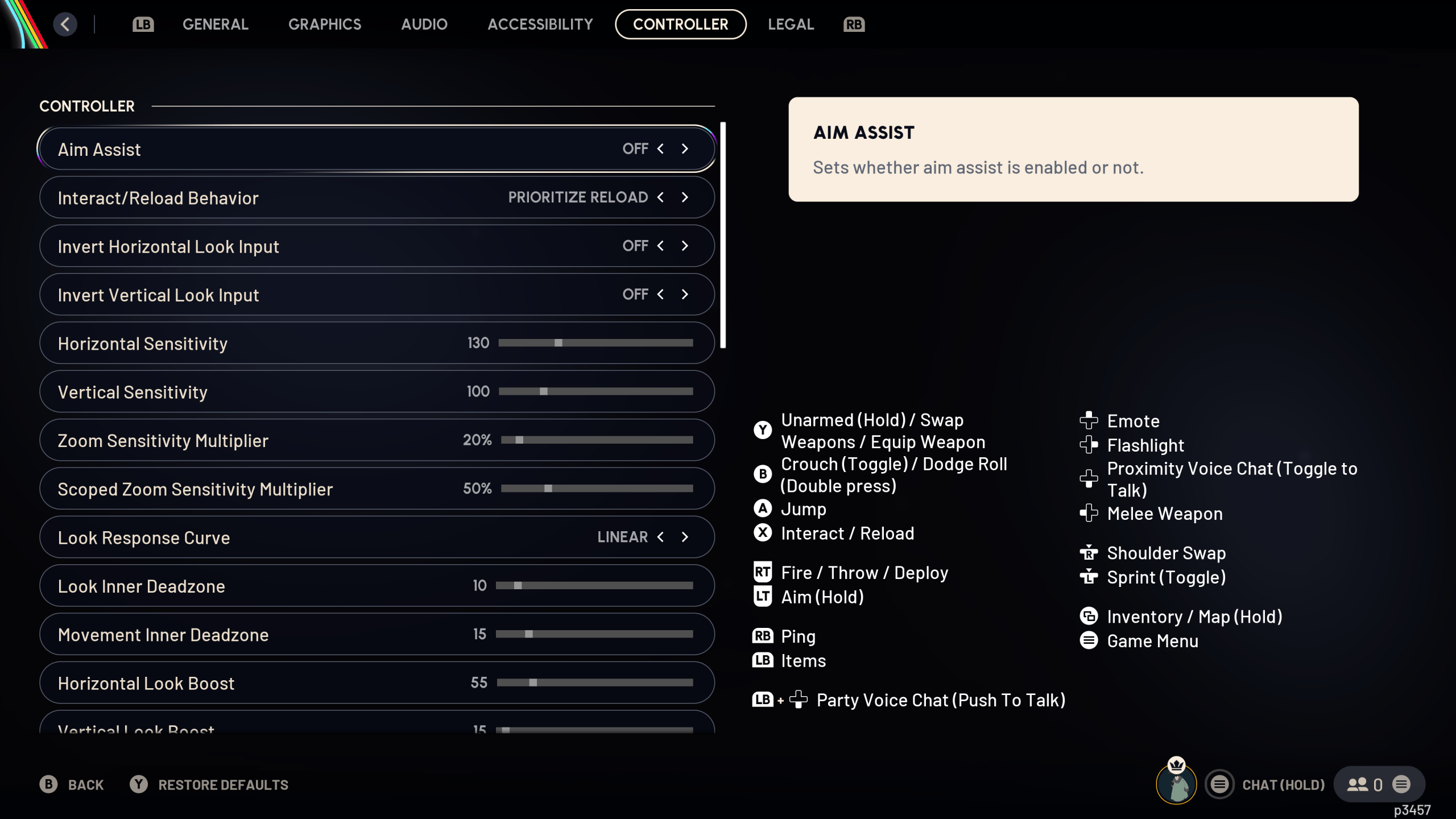
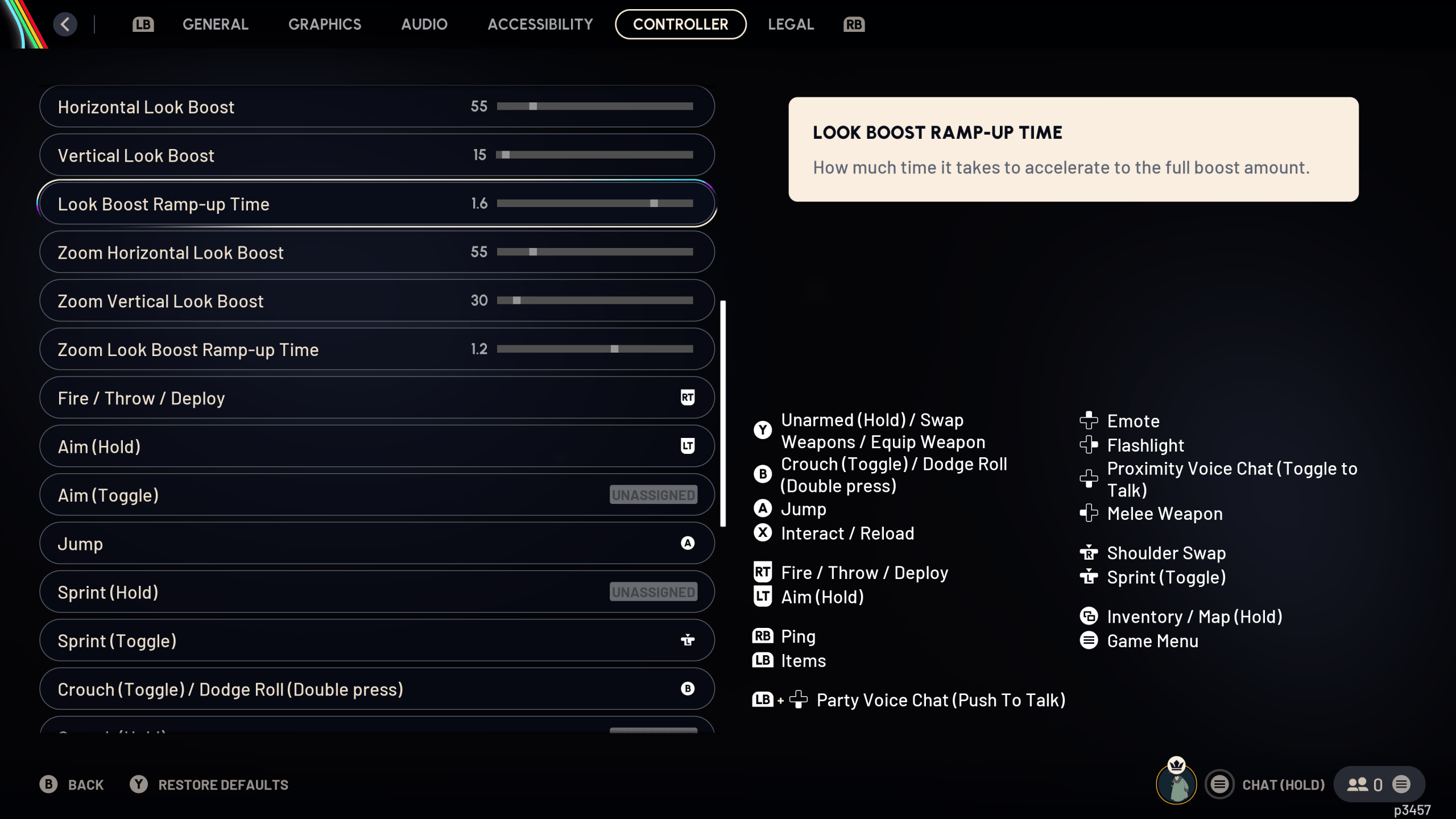
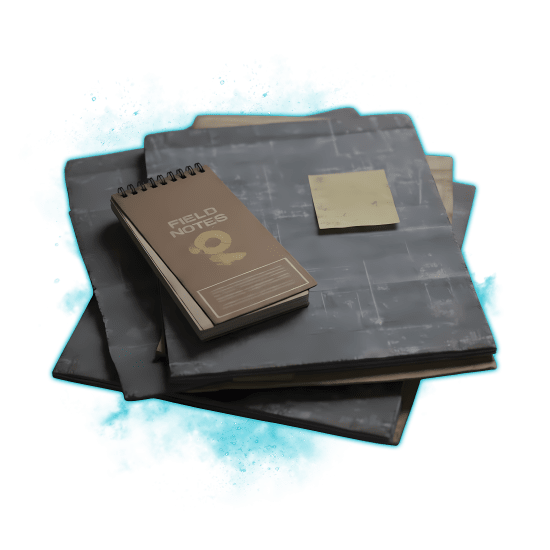
Let’s cut to the chase here. You know why you’re here, I know why you’re here. In the screenshot above are the controller settings I’ve tested, and they work perfectly. But that’s for me. Down below, I’ll explain each of the best controller settings for ARC Raiders and how to find a perfect spot yourself. And if you want to read more of me yapping about the settings, see the part after this one.
- Aim Assist: Off. I find it much more responsive, as aim assist in this game is weird. It’s too weak and too strong at the same time, and in close-quarter fights, aiming with it turned on is a nightmare.
- Interact/Reload Behavior: Up to your taste. I found that "prioritize reload" works best for me, as I’ve managed to accidentally interact with items during shootouts.
- Invert Horizontal/Vertical Look Input: Up to you.
- Horizontal Sensitivity: Not lower than 100. If you want to compete with KBM players, this is your only option. I’ve seen people setting it to 300, but it’s too much for me.
- Vertical Sensitivity: Same here, not lower than 100. I prefer it to be a bit lower than horizontal, as it helps me to land headshots.
- Zoom Sensitivity Multiplier: The higher your sense is, the lower I’d set it. I feel convenient between 10-20, depending on the controller I use.
- Scoped Zoom Sens Multiplier: Default setting is fine.
- Look Response Curve: Most important setting, along with Sensitivity. Three types available: Exponential, Linear, and Sinusoidal. Exponential is slower in the beginning, Sinusoidal is faster, and Linear doesn’t influence your input. More on that in the second part of the article.
- Look/Movement Inner Deadzone: The lower the better. If your gamepad has stick drift, raise it. If it feels jittery, raise it too.
- Horizontal/Vertical Look Boost: This one is preferential. Most pro players advise putting it on 0 to get true raw input, but I feel more convenient with it turned on. It helps me turn faster with lower sensitivity.
- Look Boost Ramp-up Time: Essentially, how long you need to push the stick for boost to kick in. Entirely preferential.
- Zoom Horizontal/Vertical Look Boost: Same logic as with normal look boost. I forgot to actually turn that off. I usually play with Zoom boost set to 0.
- Zoom Look Boost Ramp-up Time: Same as with normal look boost ramp-up.
There’s a much more detailed guide by a user on Reddit. It explains why the aim assist is bad. It’s a bit dramatic, but what the person there says stands true. I’m not going to cover best button assignments, as this is a personal preference, but I feel like the default button mapping is fine.
Detailed (Sorta) Breakdown of Controller Settings
When looking for the best controller settings for ARC Raiders, I’ve tested many various approaches. Some people recommend using a claw grip, but I can’t aim with one. Some people advised changing the aim response curve, and that was the best decision ever.
Controller Response Curves
I usually use something akin to the COD’s Dynamic curve. Various games call it different names, but it basically means your stick microadjustments are faster at first, and as you pull the stick further, the speed evens out. Here are the types of all response curves available in ARC Raiders:
- Exponential: Slower at first, then gains speed
- Linear: Direct input all the way. Doesn’t speed up or slow down as you pull the stick.
- Sinusoidal: Faster at first, slows down if you pull the stick long enough.
The default response curve in ARC Raiders is exponential, which means your microadjustments start out slower and then speed up. Since I was used to a sinusoidal response curve, I tried using one, but it just didn’t sit right with me. There was something… Off.
It turns out that ARC Raiders has some hidden controller settings that cannot be turned off. Something to do with aim smoothing. And then I tried linear. I don't want to switch back. Let me talk about the pros and cons of each response curve.


You got -20% OFF 
ARC Raiders Controller Response Curve Pros & Cons
Ideally, the response curve should fit your style of gameplay. Exponential for mid to long range shootouts, Sinusoidal for CQC, Linear is the best of both worlds, but requires spending your time actually practicing it to become good. Let’s break these response curves down.
Exponential:
PROS
- Better for new players.
- Forgives full-tilt inputs.
- Better for long-distance fights.
CONS
- Slow as molasses.
- Turning fast is a big problem.
- Bad for improvement in the game.
If you really want to become better at aiming in this and other games, I do not recommend using the exponential setting anywhere. It’s more forgiving, yes, but it’s like riding a bicycle with training wheels. Sooner or later, you’ll have to take them away, or everybody will laugh at you.
Sinusoidal:
PROS
- Better if you’re experienced.
- Minor adjustments are more accurate.
- Allows quick movement and aiming.
CONS
- More demanding of your aim.
- Full-tilts = Bullet whiffs.
Sinusoidal is already much better, and if it were any other shooter, I’d probably settle for it. In ARC Raiders, however, anything but linear feels very strange. You gotta play with the curve to realize what’s wrong with it.
Linear:
PROS
- Best if you’re willing to learn.
- Closest to raw input.
- Compete with KbM players easily.
CONS
- Extremely demanding.
- Doesn’t forgive mistakes.
- You will die a lot in the beginning.
I usually hate using Linear in other shooter games, but in ARC Raiders, it feels just right. I’d actually say it’s probably the best game to learn this response curve to dominate in other games as well. It’s relatively slow-paced, if you don't take tryhards into account. I heavily suggest learning it in this game, and you will see that your performance will improve after like 5-10 hours of practice.
Browse our hottest ARC Raiders Boosting services







Some More Controller Tips for ARC Raiders
This section is completely unnecessary to the article, but as an ex-KbM player, it was really hard for me to use gamepads in multiplayer shooters. There are some pieces of advice I’ll give you below. Whether to follow them or not is completely up to you:
- Buy a Stick Extender: KontrolFreeks, Skull&Co, SCUF, there are tons of them on the market, and they usually cost $5 to $10. They let you make the microadjustments even more precisely, as they effectively create a larger arc for aiming. They are a game-changer, trust me. Not sponsored btw.
- Think of Pro Controller: Nowadays, pro controllers can be cheaper than your official XBOX or PS5 controller. The main reasons to buy them are sticks that don’t drift and remappable back buttons. These really help in competitive games.
- Play Wired: The response time of an official wireless controller is super high. Around 125-250 hz on XBOX and PS5. Playing wired somewhat improves the latency. Some wireless pro controllers allow up to 500hz, which really improves the experience.
- Remap the Dodge Button: It’s important for ARC Raiders, rather than other games. Dodging is bound to the O or B buttons by default. Change that to a shoulder button, since it will allow you to dodge while keeping the enemy in your sights, because you won’t need to lift your thumb from the stick.
- Use High Sens: You want to turn around quickly if someone attacks you from the back. High sens allows you to perform some crazy maneuvers. Sensitivity is what really separates you from the greats.
I think that’s everything I can recommend. Following these tips helped me to improve my gaming experience not only in ARC Raiders, but in all console shooters as well. Master the aiming, and you’ll realise that the KbM players are at a disadvantage even without the aim assist on!
Read our other ARC Raiders guides:
F.A.Q
What controller settings matter most in ARC Raiders?
The most important ones are sensitivity, aim assist, and response curve. In short, put sensitivity as high as you can control it, turn off aim assist, and put the response curve on Linear.
What deadzone in ARC Raiders should I use to stop stick drift?
Usually, 10-15 are enough to stop it on most controllers. If it doesn’t stop, consider changing your controller, as it might be broken.
Which response curve is best for a consistent aim in ARC Raiders?
Linear is the best, as it doesn’t influence your input in any way. You can also use Sinusoidal if Linear feels too difficult to control.
ARC Raiders how do I balance fast turning with accurate tracking?
Set your horizontal and vertical sensitivity high and ADS sens low. For example, if your sens is ~150, turn your ADS sensitivity to 15%.
What should I change first if my aim feels too twitchy for ARC Raiders?
Consider checking the response curve and dead zone. If your controller feels twitchy with a low deadzone, raise it slightly.
What should I change first if my aim in ARC Raiders feels too slow?
Increase the horizontal and vertical sensitivity, or change the ADS speed.